
Too many moving parts
Teams end up stitching together prompts, scripts, retrieval, APIs and outputs across multiple tools with little visibility into how the workflow actually works.
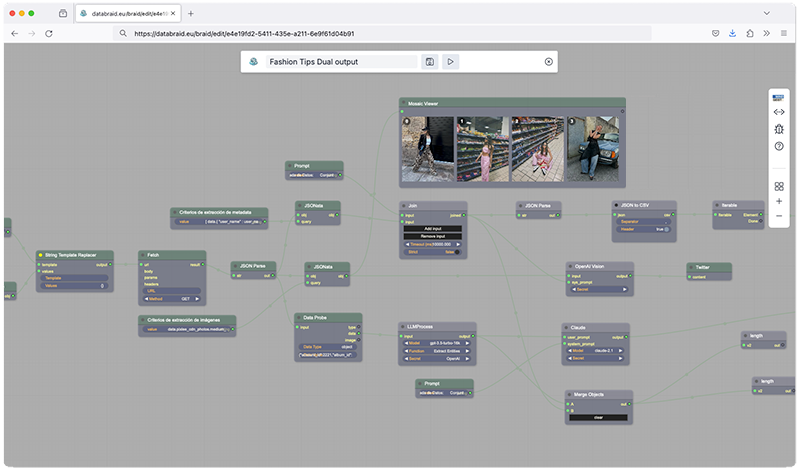
Why teams use DataBraid
DataBraid is built for teams that need more than prompt experiments. It gives you a visual way to combine sources, knowledge, models and outputs into workflows that can be understood, iterated and eventually exposed as reusable services.
Teams end up stitching together prompts, scripts, retrieval, APIs and outputs across multiple tools with little visibility into how the workflow actually works.
Useful analysis often depends on context, documents, external tools and repeatable processing steps. A chat box alone is rarely enough.
When data pipelines live in code only a few people understand, iteration slows down and operational handoffs become fragile.
How it works
DataBraid is designed first as a visual studio for braid design. You can test manually while iterating, but the same workflow can later be called through webhooks or other integrations when it is ready for real use.
Design a visual workflow that connects sources, transforms data, invokes models and defines exactly how results are produced.
Bring in knowledge bases, retrieval and third-party tools so each run works with evidence, not just a prompt.
Test manually while designing, then expose the braid through webhooks or integrations when the workflow is ready to run.
Use cases
The strongest use of the platform is when LLMs operate inside a workflow: with sources, constraints, retrieval, external tools and a defined output shape.
Turn files and notes into structured briefs, findings, risks and next actions.
Combine web search, external tools and LLM reasoning into repeatable research workflows.
Use retrieval over curated knowledge so answers can work with real context instead of generic model output.
Design the flow visually, then trigger it from other systems once the logic is stable.
Start with the right workflow
Join the beta to explore visual workflows for LLM-powered analysis, knowledge-grounded outputs and webhook-ready automation.